
301 Status Code Explained: Complete Guide to 301 Redirects
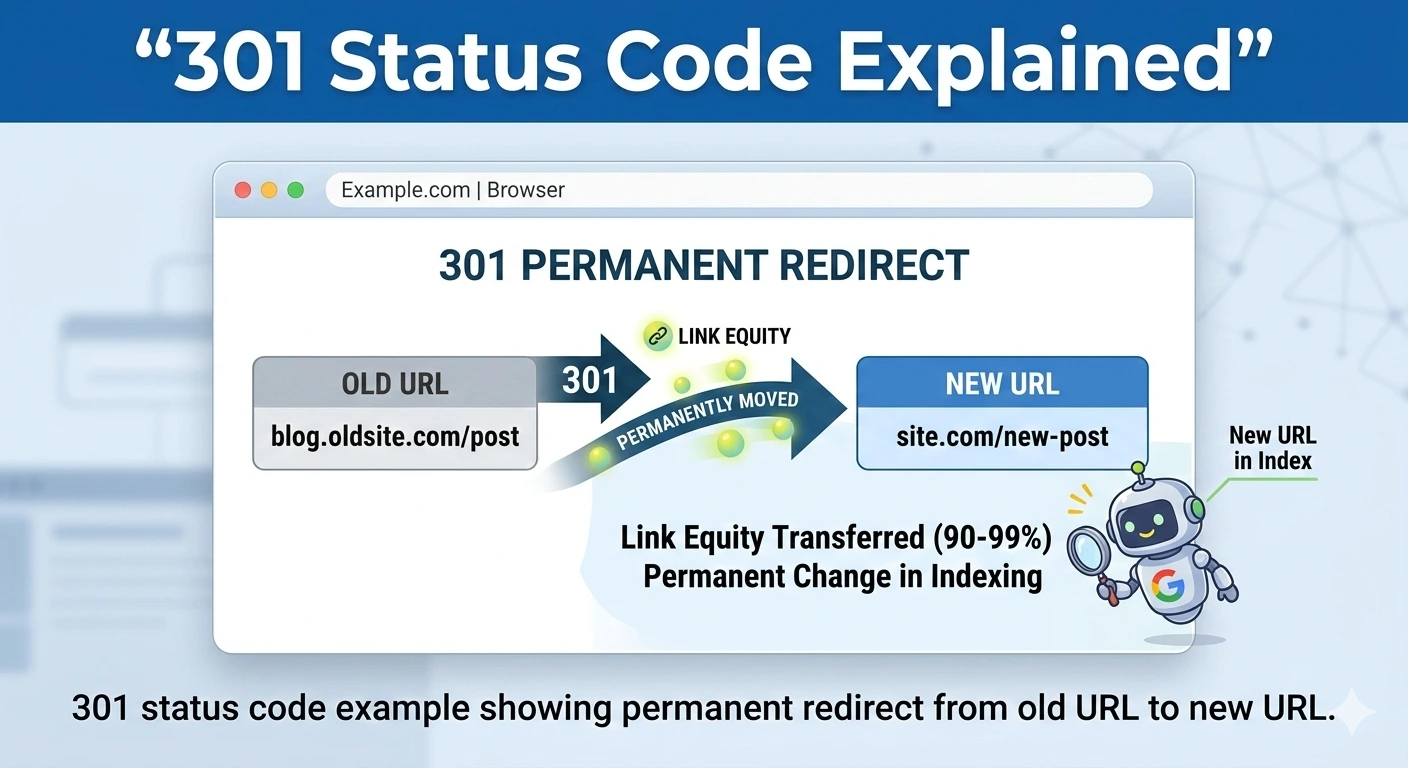
Table of Contents
Summary
It is normal for websites to undergo updates, and in effect, these updates allow the website to grow digitally. However, technical challenges are often not easily noticeable. In the course of this blog, you will understand:
- What a 301 status code means
- How 301 redirects work
- When to use them
- SEO implications and common mistakes
Websites are constantly changing, refreshing pages, reorganizing URLs, and restructuring. Improper handling of these changes can result in broken links, lost rankings, and irritated users. One technical slip-up can have a permanent effect on visibility and traffic.
A 301 status code is there to help avoid this kind of scenario. It acts like a friendly assistant that first identifies the problem, then solves it smoothly, and finally confirms the solution to both users and search engines. This article offers a detailed guide to 301 redirects and why it is so important to understand them.
What Is a 301 Status Code?
A 301 status code, also referred to as HTTP status code 301, informs browsers and search engines that the web page is no longer available and has been permanently moved to a new address/URL. To put it figuratively, a 301 server is a communicator.
From the user’s perspective, the change means they can continue browsing uninterrupted without encountering error pages. As for search engines, the 301 status code serves as a signal that also passes some of the ranking signals, links, and authority from the old URL to the new one over time.
How a 301 Redirect Works?
When a user or a search engine requests the old URL, the server returns a 301 error code along with the new location. The browser interprets the response 301 and automatically redirects the user to the updated page.
Next, the search engines will start rolling out their updates. They will slowly replace the links to the new page (instead of the previous page) in search results, while the backlinks will continue to redirect traffic to the ‘old’ address.
When Should You Use a 301 Redirect?
There could be many reasons a URL is permanently changed. If that’s the case, a 301 redirect must be implemented. Such situations include migrating a website, restructuring or merging pages, changing the domain, or replacing existing pages with new, fresher content.
A 301 error code is a straightforward way to let both visitors to your site and search engines know that the content they are looking for has been permanently moved to a different URL. It ensures the continuity of your traffic and search engine page rankings.
SEO Impact of 301 Redirects
One of the best ways to optimize a website is to use the 301 error code, which offers a form of protection. Google strongly recommends a permanent server-side redirect whenever a URL changes, as it helps maintain visibility and ranking signals during the transition. However, 301 redirects should not be considered a direct reason for either a ranking increase or a ranking decrease.
According to Statista, more than 85 billion visits occur on Google each month, illustrating the need for proper signals for crawling and indexing to achieve visibility. Another report reveals that organic search remains among the most significant sources of web traffic globally, underscoring the need to make URL changes to avoid disrupting SEO.
When your website is undergoing a redesign, migration, or content overhaul, it is crucial to consider a redirect strategy. 1702 Digital works with brands at every stage, from redirect planning to auditing to implementing SEO-safe redirects, so that rankings, traffic, and user experience remain at their highest levels, even during significant structural changes.
301 Redirect vs 302 Redirect
There is a significant difference between a 301 redirect and a 302 redirect, especially for SEO.
A 301 redirect indicates that the change is permanent. It informs search engines that the URL being redirected from is no longer in use. Gradually, ranking signals, backlinks, and the primary focus of indexing shift to the new location.
In contrast, a 302 redirect indicates that the redirect is only temporary. Initially, the URL would be indexed as before, so the 302 redirect would allow it. Search engines do not index the new page but continue to focus on the original one, meaning the backlinks and ranking signals will benefit that page.
The issue arises when a 302 for a permanent change is misused. This will inhibit the indexing of the new page, split ranking signals, and cause SEO to suffer in the long run. The appropriate redirect type should be chosen solely based on the redirection’s intent, not on the syntax.
Common Issues With 301 Redirects
-
Redirect Chains
Redirect chains are when a URL redirects to another URL, which in turn redirects to yet another URL. Each additional redirect will increase loading time and reduce the amount of work a search engine has to do while crawling. If a chain of redirects persists over time, it will weaken ranking signals and slow page load speed.
-
Redirect Loops
A redirect loop is the term used to describe a situation in which two or more URLs keep referring to each other, and this happens repeatedly without end. The consequence of such an action will be that the pages in question will not be able to load, and search engine bots will be blocked from crawling content on your site.
-
Poor Redirect Mapping
Redirecting old URLs to completely different or only very loosely related pages may work in theory, but users get confused, and overall topical relevance is weakened. A logical flow with redirected links is what search engines look for. If the redirects do not relate to one another, it can lead to a loss of trust and engagement.
-
Removing Redirects Too Early
There can still be backlinks or bookmarks directing to old URLs, and sometimes search results are even cached. Thus, removing 301 redirects immediately after a migration can bring back the broken links scenario, which would be detrimental for both user experience and SEO.
Tools to Check 301 Redirects
Using the following tools can make auditing and managing your redirects easier:
- Screaming Frog SEO Spider: looks for redirect chains, loops, and status codes
- Google Search Console: provides indexing report and crawl diagnostics
- Online Redirect Checkers (e.g., HTTPStatus.io): quick live status inspection
These tools help you ensure your redirects have the intended impact without compromising user experience or crawl efficiency.
Conclusion
301 redirects let you control how website changes are interpreted by both users and search engines. Instead of risking broken links, ranking drops, or crawl inefficiencies, a properly implemented 301 status code ensures continuity of traffic, authority, and visibility.
Whether you are planning a website migration, domain change, URL restructuring, or a full technical SEO audit, having a structured redirect strategy is essential for protecting organic rankings and maintaining search engine trust.
At 1702 Digital, we help brands implement SEO-safe website migrations, server-side 301 redirects, technical SEO audits, redirect mapping strategies, and SEO solutions. From crawl analysis and redirect chain fixes to optimizing site architecture for long-term growth, our team ensures that structural updates strengthen, not damage your search visibility.
Also Read – What Is Technical SEO? 15 Major Technical SEO Checklist
12 Important Technical SEO Elements To be Fixed on Priority
FAQs
1: Is a 301 redirect permanent?
Yes, a 301 redirect is permanent. It tells the user that the old URL is closed and the new one should be indexed.
2: Does a 301 redirect affect SEO?
By properly implementing a 301 redirect, you preserve and transfer most of the original page’s SEO value to the new URL. It helps maintain rankings and ensures users who arrive via old backlinks or bookmarks still find the right content.
3: Does a 301 redirect slow down my site?
In fact, a single 301, if properly configured, only causes a slight delay. On the contrary, redirect chains can cause a slowdown because each redirect triggers an additional server request. So, it is always best to keep redirects simple and straightforward to avoid any performance issues.
Like What You Read?
Have an Idea and Want to Build Something Together? Contact Us Now
4 Best SEO Plugins for WordPress in 2026
Fed up with trying to make your WordPress website stand out? Then you need the appropriate software kit. Although great…
Read more →
How Content Chunking Improves SEO, AI Visibility & User Experience?
The way content is structured has mattered for readability. But with AI-driven search now reshaping how information is discovered, structure…
Read more →
10 Best Shopify SEO Tools Every eCommerce Needs To Optimise The Store
There are challenges and tasks to take your Shopify store live and to rank it. With the number of online…
Read more →