
Meaning of 302 & 301 Status Codes with SEO Impacts
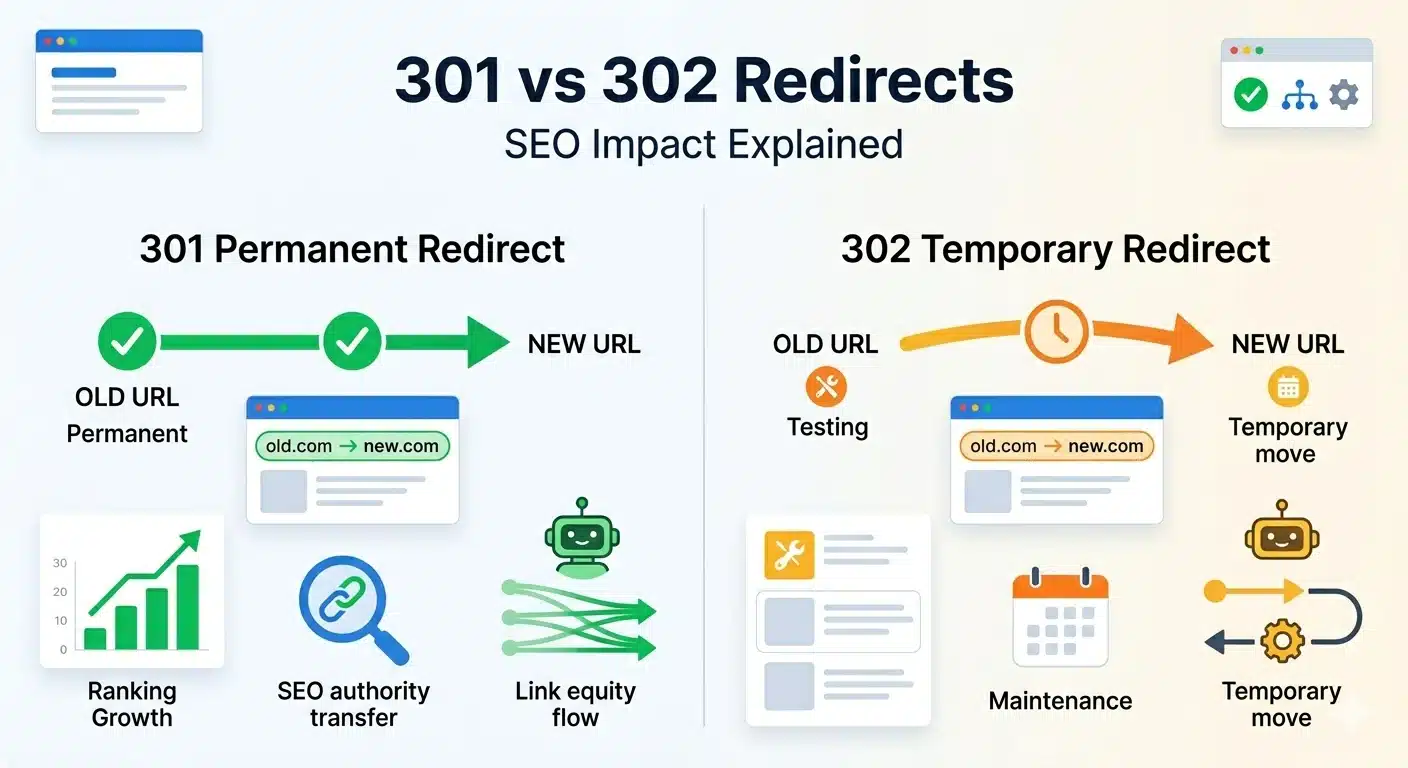
Table of Contents
Summary
A status code 302 means a temporary redirect; the requested URL has been changed, but only temporarily. Unlike a permanent redirect, it maintains the original URL’s authority in engines. In this blog, we will highlight:
- What is a 302 redirect, and its impact
- How does the 302 status code work
- Difference between 301 and 302 errors
Have you ever clicked a link only to be redirected to a different page without even realising it? A redirect is doing the trick here. Your browser received a very small yet significant message: a three-digit HTTP status code.
Among all those codes, the 302 status code is one of the most frequently used and least understood. If you are, for example, running an e-store flash sale, performing A/B testing on a landing page, or managing a large-scale website, knowing what the status 302 means is important to ensure your website is healthy, working properly, and search-engine-friendly.
In this article, we explain in simple terms what the codes mean, how it works and the difference between 301 and 302 errors and give you some examples
What is a 302 Status Code?
A 302 status code indicates that the requested content has been temporarily redirected to a different URL. The server is basically telling the user, “that what you are looking for is not here right now, but you can have a look over there, for the time being.”
To put this into simple terms, the 302 status code meaning implies that:
Resources requested have been temporarily moved to a different URL. The original page serves as the reference point. A 302 redirection can be used whenever some flexibility is desired without resorting to a more permanent solution.
What Happens When 302 Is Used?
When a 302 redirect is issued, here is the sequence of events:
- A user or a search engine bot requests URL A
- The server sends back a 302 Found status and a Location header with URL B
- The browser follows the redirect to URL B automatically
- URL A is still the main, indexed address in search engines
This is the intended behaviour by design. The original URL is expected to be back in service, so search engines maintain its ranking. The redirect URL is considered a temporary substitute, not the new permanent location.
The problem arises when programmers or marketers use a 302 where they actually intended a 301.
How a 302 Redirect Works?
A 302 redirect is sent through the HTTP response headers. For example, when a browser instigates a request, the server can reply with something like this:
HTTP/1.1 302 Found
Location: https://www.example.com/temporary-page
The browser then checks the Location header and loads the URL it specifies. These two requests usually occur within a second, completely hidden from the user but available for inspection in the browser developer tools and server logs.
Typically, 302 redirects are achieved by changing server settings (e.g., using Apache .htaccess files or Nginx config) or by making changes in the application layer. When the redirect is configured, the HTTP behaviour does not change; the client will always get the same 302 Found message.
While the process may seem simple, incorrect configurations are common. A reliable technical SEO agency, such as 1702 Digital, ensures your redirects are implemented accurately and aligned with your SEO goals.
When Should You Use a 302 Redirect?
A 302 redirect is the easiest way to inform most visitors to your website about a temporary change.
- Campaigns: Suppose you have a landing page dedicated to the Diwali discount season, which lasts only 3 weeks, and you redirect traffic from /offers to /diwali-sale-2025. In this case, you can apply a 302 redirect since the offers page will be available again at some point.
- A/B tests: Diverting some of the incoming traffic to test the performance of an alternative page while maintaining the canonical URL as the one currently indexed by the engines.
- Maintenance mode: Redirecting your visitors to a notice page during site maintenance.
- Login requirements: Forcing those who have yet to authenticate their access to the login page before redirecting them back to their destination.
- Geo-routing: Serving different webpages to users depending on the geographical location they come from, while maintaining the original URL.
In such instances, 302 is the right choice because it preserves the original URL. However, for permanent changes, a 301 would be the best fit. The link equity, the signal from backlinks that supports ranking, remains with the source URL and does not get transferred to the destination. To Google, the destination page is simply a temporary visitor rather than a permanent resident.
Then think about the business side of things. As per Statista, e-commerce sales worldwide are expected to exceed $8 trillion by 2027. A major chunk of this volume comes from direct search, and it is routed only through organic search traffic. The loss of an indexed position for a product or category page due to a discontinued or redirected link with a 302 redirect can be extremely costly in terms of revenue, not just rankings.
A technical SEO company like 1702 Digital, however, will give the same advice: don’t allow Google to fix your redirect errors. Set it up correctly the first time.
The biggest problem is when 302 redirects are continuously used. After a few weeks or months, the search engines start to revise their decisions on which URLs to index, and ultimately, you may find yourself in a situation where neither the original nor the new URL works as expected.
302 Redirect vs 301 Redirect
Knowing the difference between a 302 and a 301 redirect is essential for technical SEO.
A 301 redirect is permanent. It tells search engines, “This page has moved permanently. Please send all ranking signals, link equity, and authority over to the new URL.” Browsers cache a 301 too, so repeat visitors get redirected without needing another server request.
A 302 redirect is temporary. It tells them, “This page has moved for now. Keep the original URL indexed and hold onto its authority.” Browsers don’t cache a 302 by default.
Here’s the practical side: if you’re permanently moving pages, rebranding a site, changing URL structures, or consolidating content, a 302 will leave your link equity stuck at the old address. Your new pages start from scratch. That’s a mistake that can take months to figure out and even longer to fix.
Common Issues With 302 Redirects
Though a 302 URL redirect can work well in the right scenarios, problems can cause SEO issues, so understanding these boundaries helps prevent mistakes.
The problem starts when 302-coded redirects are used when a permanent solution is needed. In other words, there will be a mismatch between the purpose and the search engine’s interpretation of it. Some of the common problems that one may face with a 302 redirect include the following:
- Temporary redirects that stay around for a longer time than necessary
- Redirect chains formed, causing performance bottlenecks and delays
- Signalling duplicate content by both the original and the redirected URLs
- Lack of clarity while communicating which URL takes precedence among search engines
Tools to Check 302 Redirects
You don’t need advanced technical skills to diagnose redirect problems. With these tools, the process becomes easy:
- Screaming Frog SEO Spider: Crawls the whole website, sorts data based on response code, and shows all 302 redirect problems on the result page.
- Chrome Developer Tool (Network tab): Checks certain URLs and traces the whole redirection path;
- httpstatus.io: Enters the URL and receives all redirection information together with status codes instantly;
- Google Search Console: Coverage report reveals all indexing issues caused by incorrect redirects.
- Ahrefs/Semrush Site Audits: They provide powerful tools to identify the full redirection path, especially useful for larger websites.
Conclusion
The 302 redirect does not play an important role in the website’s operation, but it does affect the website’s technical performance and all SEO efforts. When you understand what a 302 redirect means and how to use it appropriately, you will know when to apply it or opt for other types of redirects.
When you want to enhance the technical performance of your website and avoid SEO errors, it is a good idea to hire a professional technical SEO agency. Such a web development agency ensures your website is optimised for both users and search engines.
FAQs
1. For how long does a 302 redirect last?
Duration is not limited. Nevertheless, if you keep the redirect in place for a long time, you risk the search engine treating it as a 301 redirect. Please consider replacing the 302 approach with a 301 redirect in such cases.
2. Does Google regard a 302 redirect as a 301 redirect?
There’s some evidence that Google treats a redirect lasting several months as a 301 redirect; however, it’s hardly reliable. Every professional technical SEO agency uses the correct HTTP response statuses rather than relying on Google to fix mistakes.
3. How does the use of 302 affect SEO?
Yes. Improper use of a 302 so that the link transfers will prevent this from occurring. Moreover, it slows down the indexation and keeps the ranking signals of a page that may never get served.
4. Why am I receiving 302 instead of 200?
This means that an interception process occurred before the content was displayed to you. Some possibilities include server-side redirect logic, CMS configuration, authorisation and login, and even georouting. You can use DevTools and httpstatus.io to determine the path of this redirection.
5. What causes a 302 status code?
A status 302 means the use of server-side reasoning, such as redirect logic in .htaccess files, an application-level framework implementation, a CMS plugin, or CDNs.
Like What You Read?
Have an Idea and Want to Build Something Together? Contact Us Now
4 Best SEO Plugins for WordPress in 2026
Fed up with trying to make your WordPress website stand out? Then you need the appropriate software kit. Although great…
Read more →
How Content Chunking Improves SEO, AI Visibility & User Experience?
The way content is structured has mattered for readability. But with AI-driven search now reshaping how information is discovered, structure…
Read more →
10 Best Shopify SEO Tools Every eCommerce Needs To Optimise The Store
There are challenges and tasks to take your Shopify store live and to rank it. With the number of online…
Read more →